Integrations
Telegram
A bot for alerts, Board commands, voice notes and a Mini App.
Nautelle can send notifications to each person's private Telegram chat through a bot you create, and the same bot lets you work on the Board from your phone. One bot serves the whole instance; every user links their own chat and picks which kinds of notification reach it.
The bot uses long polling, so your server needs outbound HTTPS to api.telegram.org and nothing else. No public URL, no inbound port.
Before you start
APP_ENCRYPTION_KEYmust be set in the API's environment. The bot token is stored encrypted (AES-256-GCM) under it. Without the key, the Telegram page shows No APP_ENCRYPTION_KEY on the server and refuses the token.APP_URLshould be the public web URL people open Nautelle at, for examplehttps://nautelle.example.com. Every message links back to it. It falls back toWEB_URL.
| Variable | Default | Meaning |
|---|---|---|
APP_ENCRYPTION_KEY | unset | 32 random bytes, base64 (openssl rand -base64 32). Required. |
APP_URL | http://localhost:3517 | Web URL used in message links. Must be https for the Mini App. |
TELEGRAM_POLL_TIMEOUT_S | 30 | Long-poll timeout for getUpdates, in seconds. |
TELEGRAM_API_BASE | https://api.telegram.org | Bot API base. Only tests change it. |
Set up the bot
Create a bot with BotFather
In Telegram, open a chat with
@BotFather, send/newbot, choose a name and a username, and copy the token it gives you.Paste the token
Go to Admin → Integrations → Telegram and use Set the bot token. The API verifies the token with Telegram's
getMe, stores it encrypted and shows only the bot's username from then on. The stored token is never shown again.Check the poller
The page shows Status, Polling (Running or Not running), Last poll and, if something failed, Last poller error. Once you have linked your own chat (next section), Send test message sends a message to it.
Replace the bot token with a token for a different bot and every linked user has to link again, because their chats belong to the old bot. Removing the bot stops Telegram delivery; notifications keep arriving in the app.
Link a user's chat
Each person links their own chat. An admin cannot link a chat for someone else.
- Open Account → Notifications and click Link Telegram.
- Nautelle creates a one-time code and opens
https://t.me/<bot>?start=<code>. - Press Start in the chat that opens. The bot receives
/start <code>and binds that chat to your account.
The code is valid for 10 minutes and works once. Only private chats are accepted, each user has one chat, and a chat already linked to another user is refused.
To unlink, click Unlink on the same page or send /stop to the bot.
Which notifications go to Telegram is set per kind on Account → Notifications, next to the in-app switch. You can also mute a project there. See Notifications for the kinds and their defaults.
Work on the Board from Telegram
Linked chats can act on the Board, not only read alerts. Every action is checked as the linked user, with the role the web would need: any member reads, an operator writes.
| Command | What it does |
|---|---|
/project | Pick the project the chat acts on, or /project <name>. A single project is selected for you. Every Board reply names its project |
/board | Columns with counts. Tap one to list its cards, ten per page. /board <column> jumps to one |
/card <n> | A card's detail, with buttons for the actions its state allows: Move, Run, Stop, Feedback, Message session, Accept, Finish |
/new <text> | The New work interview in the chat |
/newchat | Start a fresh assistant conversation |
/help | The command list |
Questions from the planner arrive as one message each, with buttons for the options and the recommendation. Reply to a message with text to give your own answer. Send a photo to attach it to the request. Send a voice message and the bot shows what it heard and uses it as the description or the answer. Voice needs an admin to configure SPEECH_TO_TEXT_URL. Without it the bot says voice input is off, and audio is never stored.
Free text that is not a command goes to the assistant, as your linked user, in a conversation shared with the web.
The Mini App
The bot's menu button can open Nautelle inside Telegram, at /tg. It signs you in with the credentials Telegram provides, with no password, and opens the Board of the project the bot passed or the one you used last. Card messages carry an Open in app button that goes straight to that card.
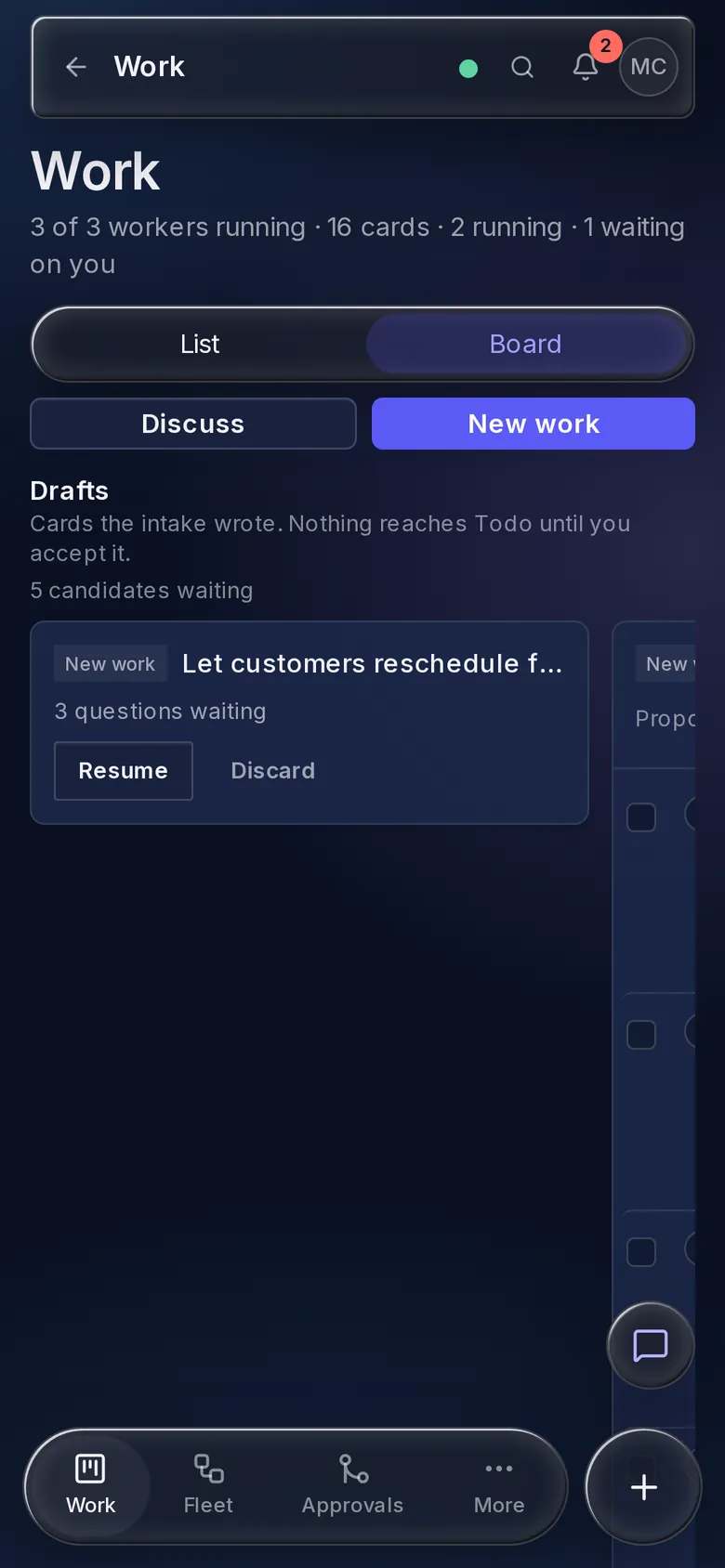
- It is the web app. The Mini App issues the ordinary web session, so every role and check is the web's own, and a viewer cannot edit.
- Only linked accounts. Telegram's sign-in data is verified with an HMAC of the bot token and refused when tampered or older than
TELEGRAM_INIT_DATA_MAX_AGE_S(one hour by default). An unlinked user is told to link in Account → Notifications first. - It needs HTTPS. Telegram opens a Mini App only from an
httpsAPP_URL. With any other URL the menu button stays Telegram's default and messages keep plain links.
Why long polling
The first deployment target is a home server that may sit behind NAT with no public HTTPS endpoint. Long polling (getUpdates) needs only outbound HTTPS, so the bot works anywhere the API can reach the internet. Exactly one poller runs, guarded by a PostgreSQL advisory lock, which matches Nautelle's single-API-instance design. A webhook mode does not exist.
Approve from Telegram
A pr.awaiting_approval message can carry two inline buttons: Approve and Request changes.
- Every press is checked again from scratch: the chat must be linked, the message must have been sent to that user, the account must be active, and the user must be an operator or admin of the project right now.
- The decision is bound to the pull request's head commit that the message showed. If someone pushed since, the press is refused and you decide in Nautelle.
- Request changes asks for a note. Reply to the bot's prompt with the text (at most 4 KB); the note goes to the worker.
- Each outcome is audited as
telegram.approval, and the approval itself is audited like one made in the web app.
If the pull request is unknown, not open, or the runner cannot be reached when the message is sent, the message goes out with its link only and no buttons.
pr.awaiting_approval is emitted only when the Code Sentinel orchestrator supports merge approval (mergeApproval, plugin issue #8), which is not released yet. The approval file Nautelle writes also does not match the format the plugin branch reads today. Until both land, approve through a GitHub review or the cs:approved label. See Merge approvals.
Limits
| Rule | Value |
|---|---|
| Duplicate folding | The same user, kind, project and slot within 15 minutes updates one notification instead of sending a new one |
| Rate limit | 20 Telegram messages per user per 10 minutes. Beyond that, items are collected into one digest sent at the end of the window |
Telegram 429 | Retries honour Telegram's retry_after |
| Runner offline | One runner.offline per runner after more than 5 minutes offline, to admins only |
What a message contains
A message is plain text: the project, the slot or issue, a one-line reason and a link to the right page in Nautelle (APP_URL). It never includes pane text, prompts, code or secrets.
What Nautelle stores for Telegram: the chat id and username of each linked user, the delivery state of each message, and the encrypted bot token. Bot configuration, linking, unlinking and rule changes are audited.