Skip to content
Nautelle
MITOpen source and self-hosted

One sentence in. A merged pull request out.

Describe the work. Nautelle interviews you, writes the cards, draws the design, and runs Claude Code on each card until its pull request is green and waits for you. Self-hosted, on your own machines.

nautelle.example.com/projects/northwind-web/board
The Nautelle Board for a demo project: cards in Inbox, To Do, In progress and Finished, with PR chips, CI dots and a stack.The Nautelle Board for a demo project: cards in Inbox, To Do, In progress and Finished, with PR chips, CI dots and a stack.

The Board of a demo project. Every screenshot on this page shows fictional data.

Built on the tools your fleet already runs on

ClaudeGitHubtmuxGitDockerPostgreSQLRedisBunCaddyCloudflareTailscaleTelegramHomebrewn8nNext.jsNestJS

The agent writes the code. Everything around it is still your job.

Turning an idea into a task an agent can finish, checking the screen it builds, feeding red CI back, noticing a session stuck on a question, merging, keeping track of the cost. With three agents at once, that is the whole day.

Nautelle does that part, and asks you only for the decisions.

you, every card
  1. $ claude "add recurring jobs"# which rules? which edge cases? it guesses
  2. $ git worktree add ../wt-c43 && tmux new -s c43# one more terminal to keep an eye on
  3. $ open http://localhost:3000# is this the screen you meant?
  4. $ gh pr checks 412# red again; paste the log back to the agent
  5. $ tmux attach -t c45# it has been waiting on a question for an hour
  6. $ gh pr merge 409# and what did all of this cost?

How it works

From an idea to a merged pull request, in seven steps.

You decide what to build and whether it ships. Everything between is a card moving across the Board, and every step has a screen.

  1. 01 · New work

    Say what you want

    One sentence in New work, a /new message to the Telegram bot, or a line to the assistant. Voice notes and photos work too.

  2. 02 · Intake

    The planner interviews you

    Question rounds with a recommended answer and the reason for it, read from your repository. Blocking questions wait; the rest take the default.

  3. 03 · Drafts

    One card, a split, or a stack

    Small work becomes one card. Independent parts split into several. Work that builds on itself becomes a stack of stages that share one design.

  4. 04 · Design

    Design before code, if it needs one

    HTML mockups in frames, in your project’s UI kit. Pin comments on the frame, ask for a revision, approve. The approved design ships with the card.

  5. 05 · Run

    A worker runs the card

    Its own worktree, tmux session and Claude Code session, with your coding rules in the prompt. Auto-run starts it as soon as its dependencies land.

  6. 06 · Shipping

    CI is watched for you

    The draft PR turns ready when the worker finishes. Red checks start a fix round with the failing log, up to three times.

  7. 07 · Merge

    You accept, it merges

    Green cards wait in Finished for your Accept, or merge on their own where you allow it. The branch and worktree are cleaned up.

nautelle.example.com/projects/northwind-web/board
The whole chain on the demo project, recorded in the real app. 37 seconds, no sound.

Or run the fleet on GitHub issues

For bigger waves, the Code Sentinel orchestrator picks up issues labelled ready and builds each slot of a parallel plan in its own worktree. Its slots show up on the Board next to your cards.

  1. /code-sentinel:spec
  2. cs:ready
  3. orchestrator
  4. parallel slots
  5. merge approval
  6. merged

The Steward watches both lanes

A worker that goes silent, stops at a dialog or hits a quota gets nudged or resumed, and you get one digest of what happened while you were away. Handoff notes carry context into the next round.

Plan it, design it, ship it. Watch, approve and pay for it.

Plan

An interview, not a ticket form.

New work starts from one sentence. The planner reads the repository, asks only what it cannot find there, recommends an answer to every question, and writes cards in English whatever language you typed in.

  • Up to four question rounds; blocking ones wait for you
  • One card, a split into several, or a stack of stages
  • Drafts keep unfinished intakes; nothing reaches To Do until you accept it
More about plan
nautelle.example.com/projects/northwind-web/board
The New work dialog: the planner asks a blocking question with a recommended answer.The New work dialog: the planner asks a blocking question with a recommended answer.
Design

See the screen before anyone writes it.

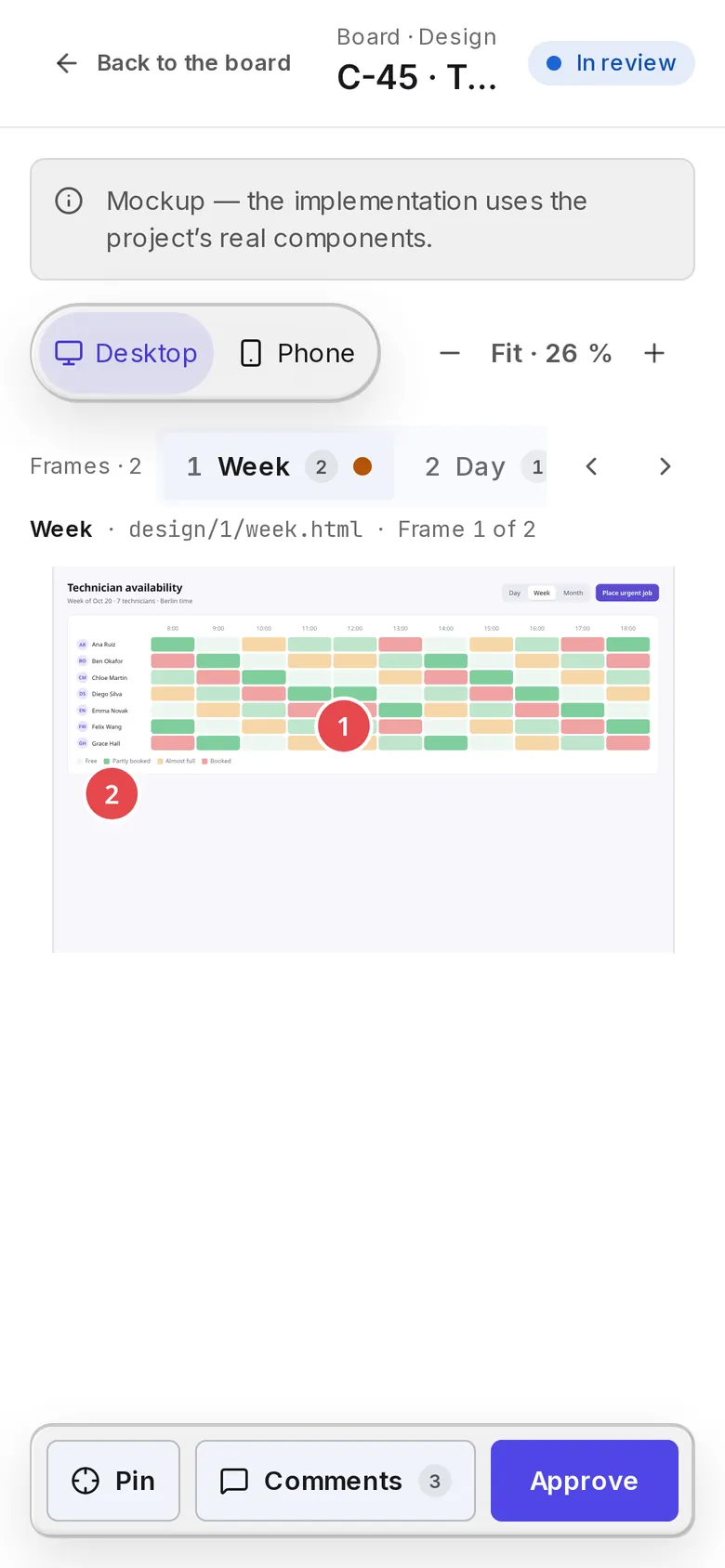
Cards and stacks that touch the UI get HTML mockups built in your project’s own UI kit. Review them by frame, on desktop and phone, in light and dark, and pin a comment where the change goes.

  • Frames as tabs, revisions you can compare
  • Pinned comments go into the next revision
  • Approve once; the design is committed with the work
More about design
nautelle.example.com/projects/northwind-web/board/cards/45/design
The design viewer: a mockup frame with pinned comments, revisions and an Approve button.The design viewer: a mockup frame with pinned comments, revisions and an Approve button.
Ship

Cards that finish their own pull requests.

Run a card and a worker gets its own worktree, tmux session and Claude Code session. It opens a draft PR, marks it ready when done, and fixes red CI from the failing log.

  • Up to three CI fix rounds, then it asks a person
  • Your project’s coding rules go into every worker prompt
  • Message the running session, or answer its question, from the card
More about ship
nautelle.example.com/projects/northwind-web/board/cards/44
A card page: the running round, its draft PR, CI fix rounds and token-saver savings.A card page: the running round, its draft PR, CI fix rounds and token-saver savings.
Watch

Every slot on every machine, live.

A runner on each machine reports tmux sessions, worktrees, sessions and pull requests. The Fleet shows the orchestrator and its slots; Sessions shows every turn, tool call and subagent with its tokens.

  • Slot status, checkpoints, the PR and its checks
  • Read-only live pane and audited terminal attach
  • Runs, rounds and sessions kept as history
More about watch
nautelle.example.com/projects/northwind-api/fleet
The Fleet: the orchestrator and three slots with their worktrees, checks and progress.The Fleet: the orchestrator and three slots with their worktrees, checks and progress.
Approve

Green is not merged until a person says so.

Pull requests wait in a queue with their checks. With away mode on, the permission prompts Claude Code would show in a terminal come to the browser and Telegram instead, with a countdown.

  • Decisions bind to the head commit
  • Approve or deny tool use from your phone
  • Nautelle never merges or reviews on its own
More about approve
nautelle.example.com/projects/northwind-web/approvals
Action requests: a permission prompt from a card session, with a countdown, Approve and Deny.Action requests: a permission prompt from a card session, with a countdown, Approve and Deny.
Pay

Know what every run would cost, and spend less of it.

Tokens from transcripts and telemetry, priced against a versioned price table. Budgets alert or stop spend, and Token Saver filters noisy command output before an agent reads it.

  • Cost by project, model, issue, slot and card
  • Unknown models show as unpriced, never as zero
  • Token Saver reports what it kept out, per filter
More about pay
nautelle.example.com/usage
Usage: API-equivalent cost over time, budget status and a breakdown by project.Usage: API-equivalent cost over time, budget status and a breakdown by project.

Stacks

Work too big for one card becomes a stack.

When what you asked for builds on itself, the planner does not hand you one giant card or a pile of loose ones. It proposes stages in order, each with its own cards, under one design. The Board then ships it stage by stage.

Stages wait for each other
Every card of a stage depends on every card of the stage before it. Cards inside one stage are independent and run in parallel.
One design for the whole thing
A stack has a single shared design. Turn on “design required” and no card runs until that design is approved.
Accept what you agree with
The intake proposes the stages and cards as drafts. Accept all, accept one by one, or reject a card before anything reaches To Do.
Auto-run takes it from there
Mark the cards Auto-run and each stage starts as soon as the stage before it is done. You review pull requests, not the plan.
How stacks work

Proposed stack · 5 cards

Offline mode for the technician app

design required
  1. 1Local storecurrent

    • Local job store with SQLite
  2. Stage 2 waits on all of stage 1

    2Sync

    • Outbound queue for status updates
    • Background sync on reconnect
  3. Stage 3 waits on all of stage 2

    3Conflicts and UI

    • Resolve edit conflicts
    • Offline banner and pending badge
nautelle.example.com/projects/northwind-web/board/stacks/4
A stack page: three stages that build on each other, with their cards and the shared design.A stack page: three stages that build on each other, with their cards and the shared design.

A stack on the Board: stages, their cards and the dependencies between them.

Run it from your phone.

Agents work while you are away from the desk. Capture an idea, answer a worker’s question or approve a merge from wherever you are.

  • The whole app, phone-sizedBoard, designs, approvals and sessions work one-handed, with New work one tap away.
  • Telegram Mini AppOpen Nautelle inside Telegram, signed in by Telegram itself. /new starts an intake from the chat.
  • Voice and photosDictate the work or send a screenshot of the bug; it becomes the brief of the card.
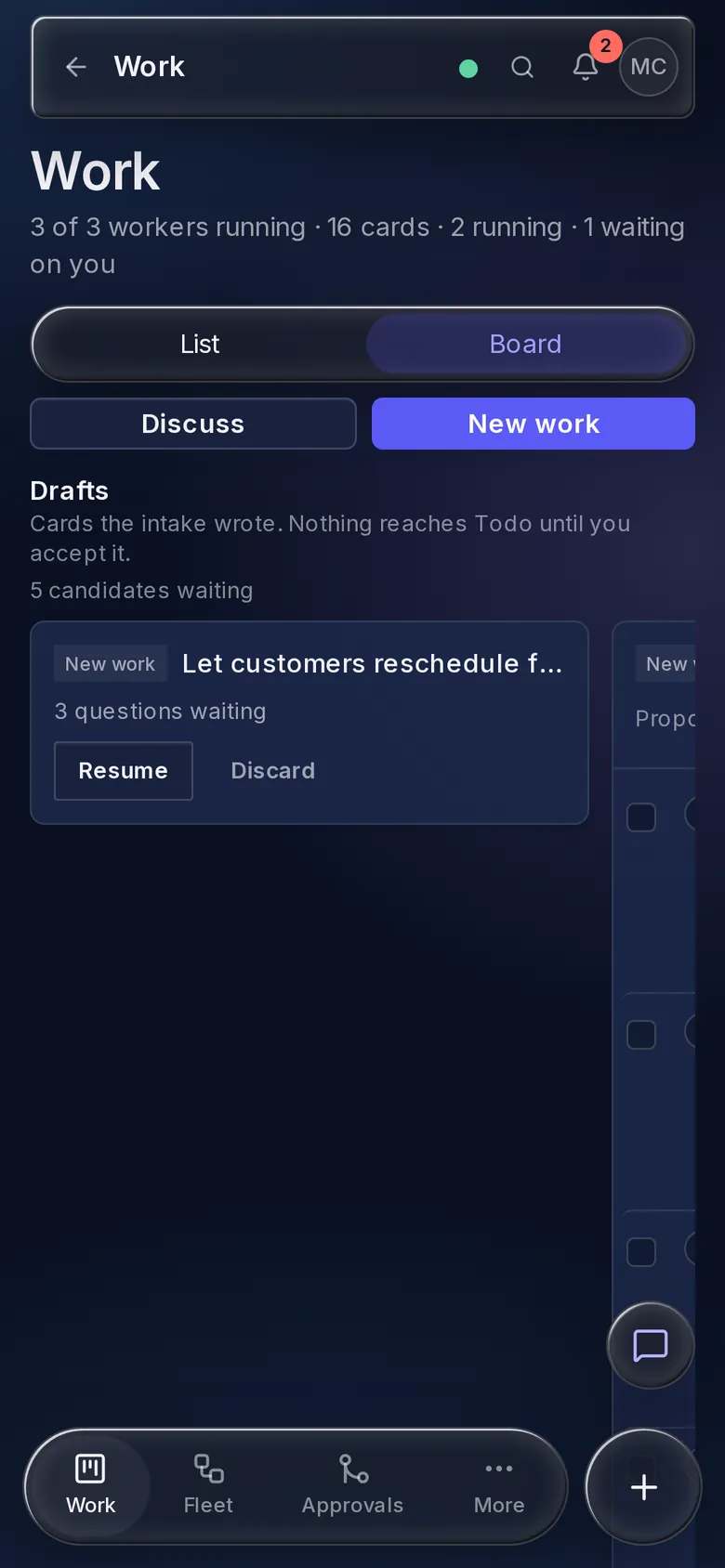
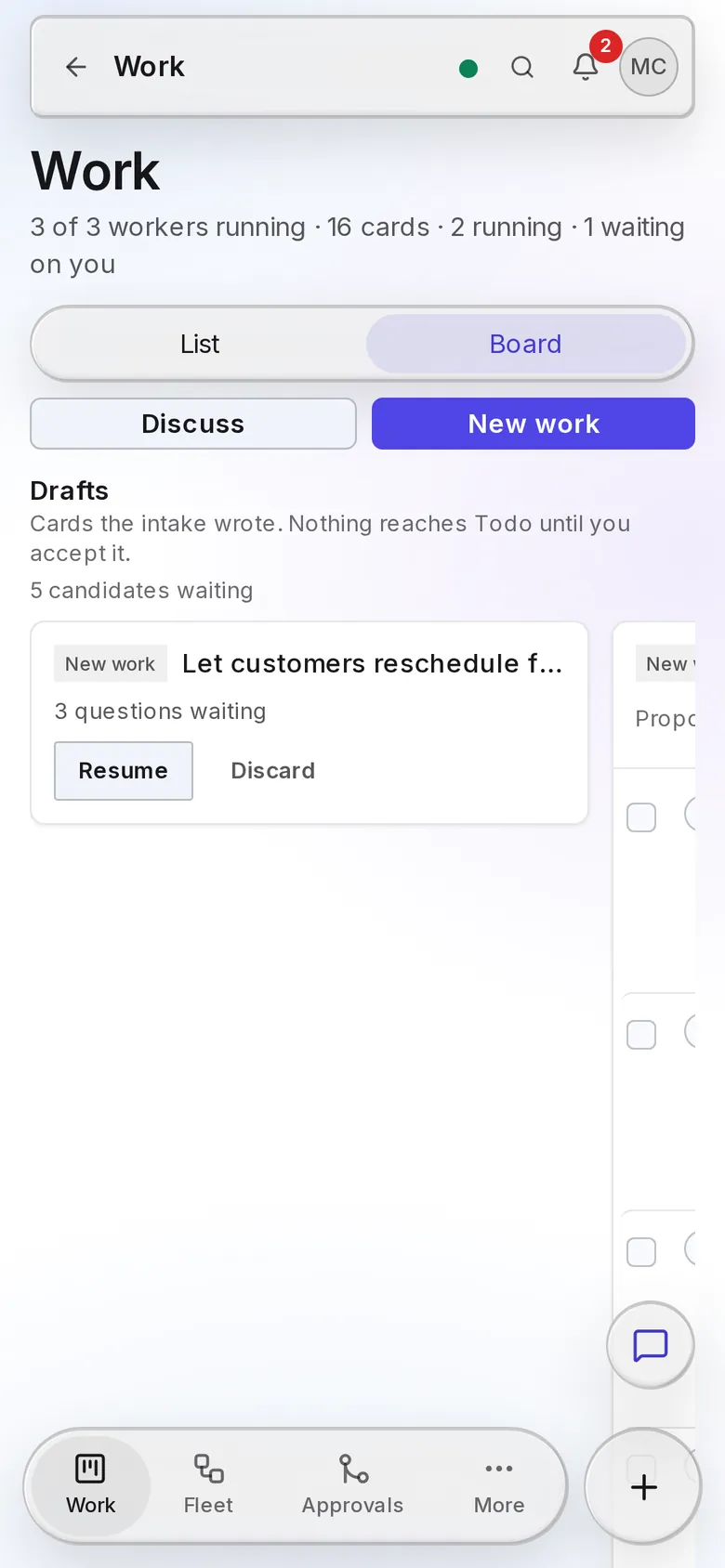
The Board on a phone, with drafts and the bottom capsule.The Board on a phone, with drafts and the bottom capsule.
The Board, with drafts to accept
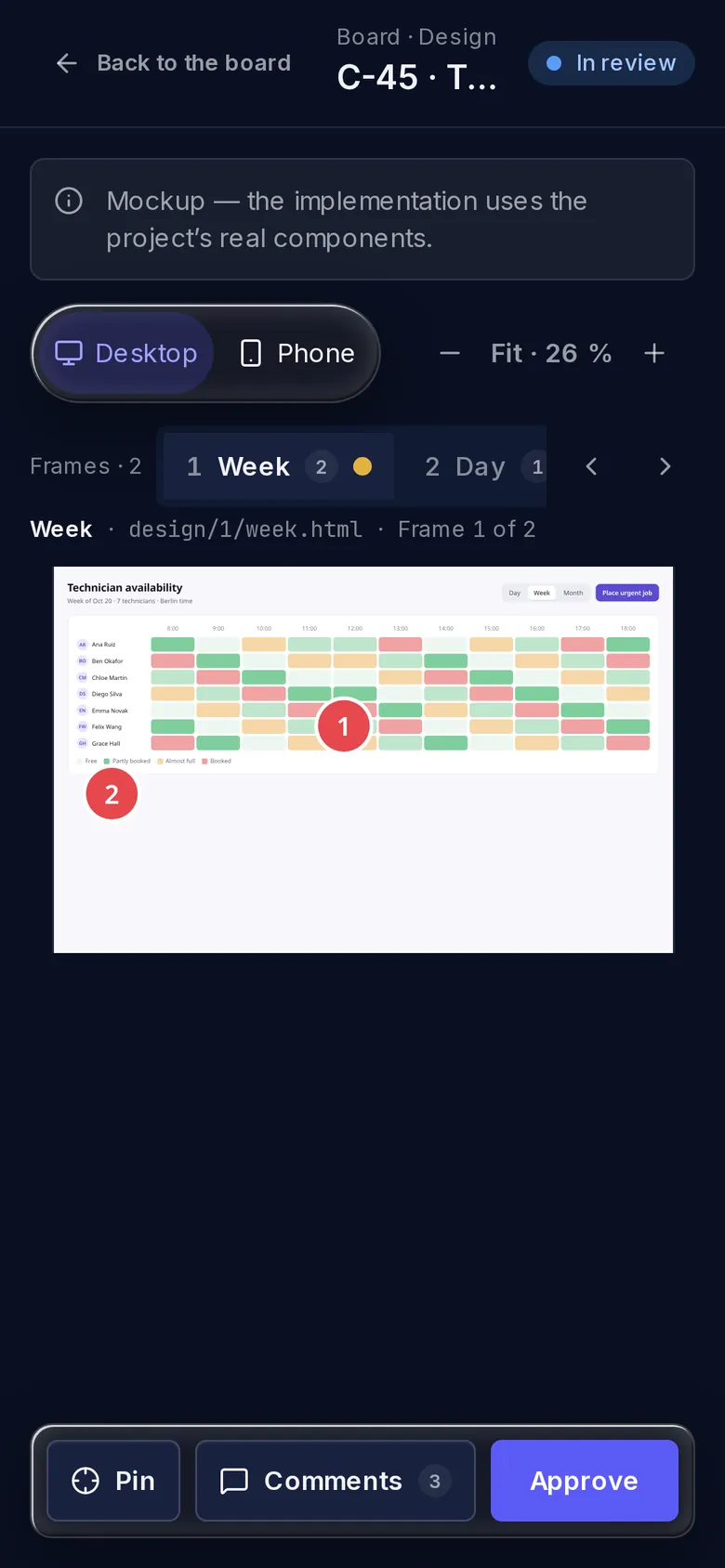
The design viewer on a phone, with pins and Approve.The design viewer on a phone, with pins and Approve.
A design to review and approve
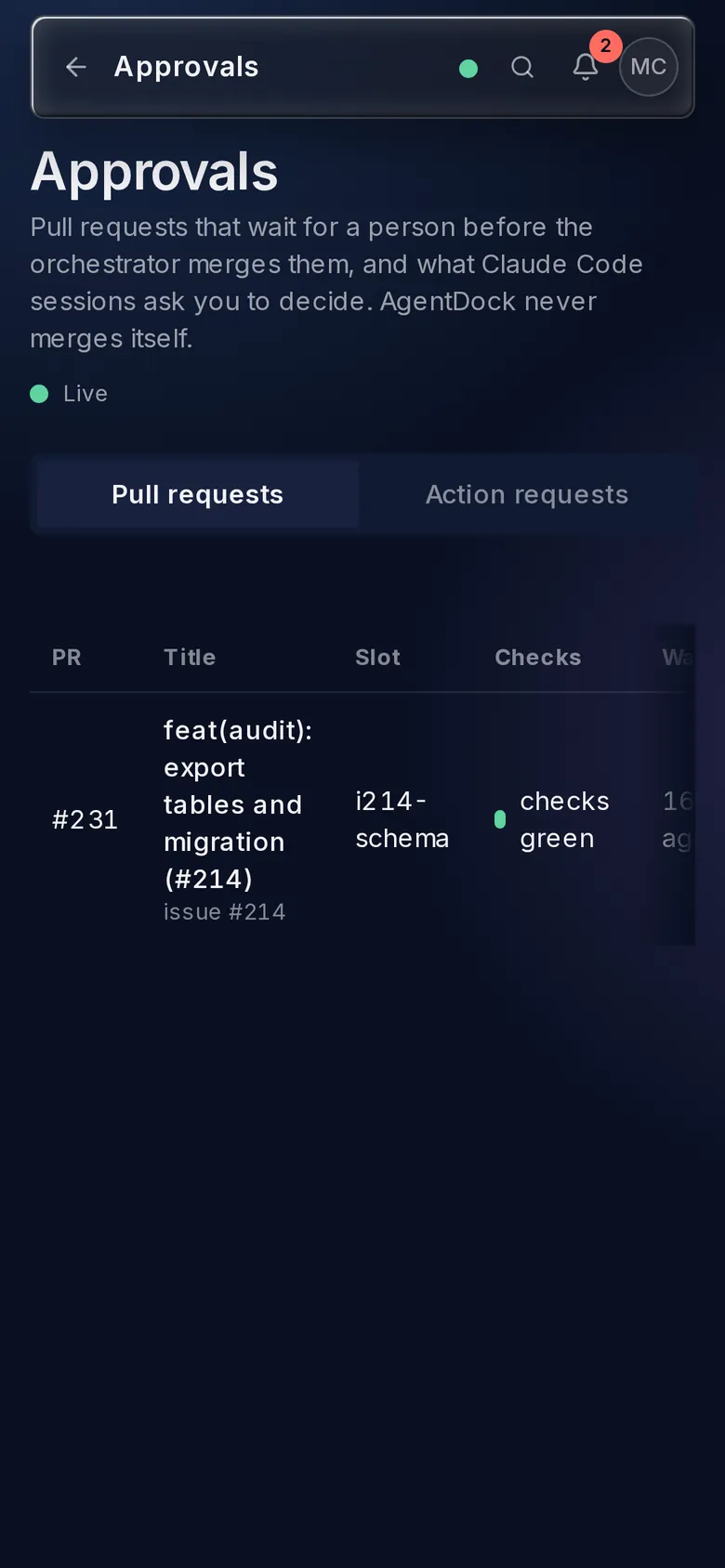
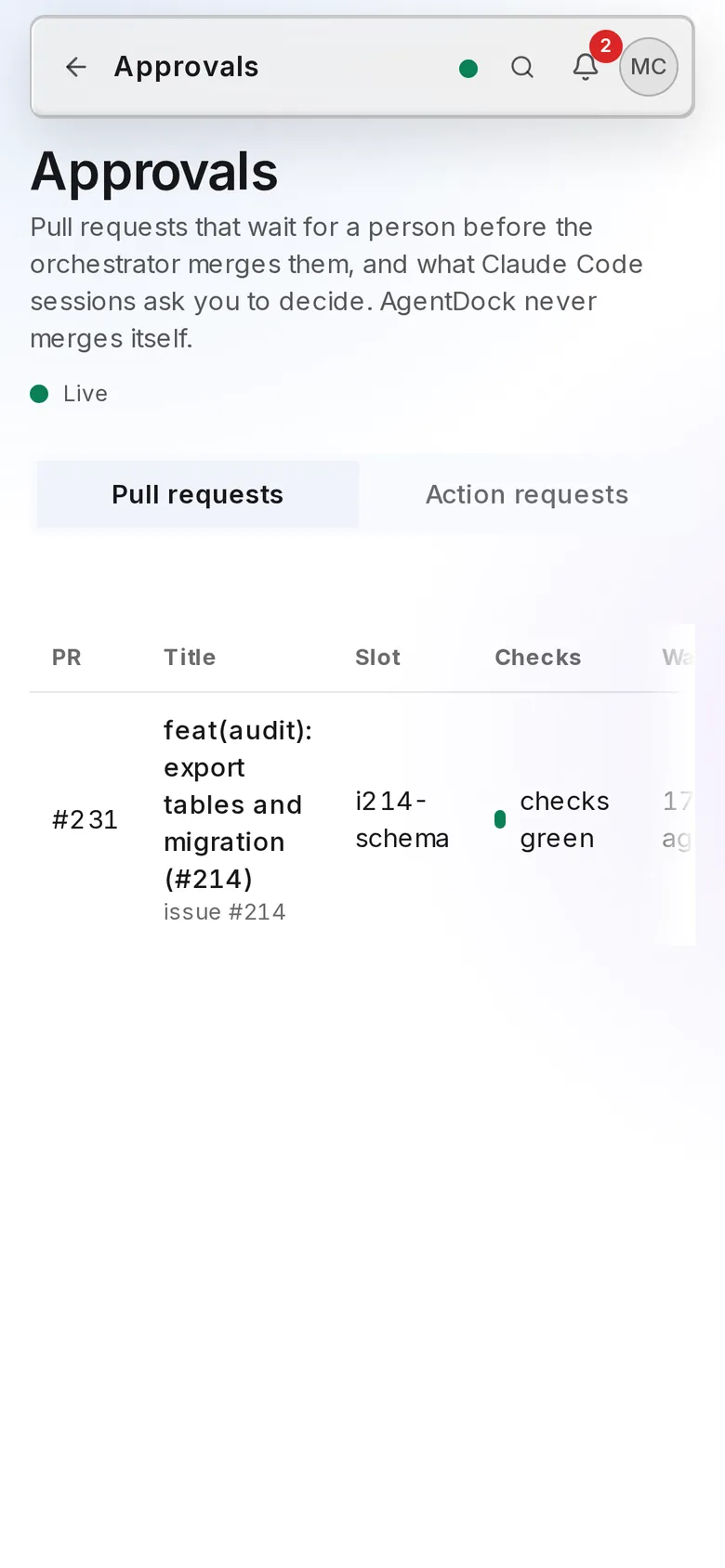
Approvals on a phone.Approvals on a phone.
A merge waiting for you

Your agent machines never open a port.

Each machine runs one small runner that dials out to your server over a WebSocket. It executes a fixed list of typed commands, never a shell string, and only inside the repos you connected.

Your browser

any device

Same-origin web app, cookie session, live updates over WebSocket.

HTTPS + WSS

Control plane

your server, Docker Compose

webNext.js 16
apiNestJS 11
postgressource of truth
redisschedule timers
WSS, dialed out

nautelle-runner on mac-studio

macOS, arm64

tmuxgit worktreesclaudegh

nautelle-runner on build-box

Linux, x64

tmuxgit worktreesclaudegh

No keys to hand over

Claude and GitHub credentials stay on the runner machine. The server never sees an API key.

Metadata, not transcripts

Sessions are stored as models, token counts and tool names. Prompts and responses are not.

Nothing phones home

No telemetry, no analytics, no update pings. The only outbound calls are the ones you configure.

The rest of the job, already built.

Skills from skills.sh

Search the catalog, read the files before you install, then add a skill to a repo as a pull request or to a profile. Design turns use the skills you pick.

  • cs-securityAndreyBegma/code-sentinel-skillsinstall to project
  • frontend-designanthropics/skillsinstall to profile
  • tddmattpocock/skillsinstall to project

Telegram

Alerts when a worker needs you, one-tap approval, /new to start an intake, and the whole app as a Mini App. Long polling, so no public URL.

C-46 is green and waiting. Bulk reassign jobs, northwind-web.

ApproveOpen in app

Steward

Watches every running card and slot for silence, dialogs and quotas, acts where it safely can, and sends a daily digest.

  • silent 12 minnudged, resumed
  • permission dialogsent to you
  • quota reachedresumes at reset

Coding rules

Write them, import them from Markdown, or scan the repository for them. Enabled rules go into every worker’s prompt.

  • Money is integer centsscanned
  • Every query is scoped by workspacemanual
  • Tests next to codeimported

Assistant

Ask about your projects in plain words, or have it start New work. Bring your own Anthropic, OpenAI, OpenRouter or xAI key, with spend caps.

What is blocking the invoices stack?

Stage 1 waits for your review of C-51. Stages 2 and 3 depend on it.

Also built in

  • Schedulescron rules that run a skill or the next round
  • Signed webhooksboth ways, HMAC, with retries and a log
  • Read-only GitHub Apppush events instead of polling
  • Hash-chained auditevery command, approval and attach
  • Teams and rolesinvite-only, per-project access

Built by the fleet it manages.

Nautelle was built with itself: specs written through an interview, waves of issues built in parallel by the Code Sentinel orchestrator, and cards on its own Board shipped through CI to a merge.

commits
1,575commits
merged pull requests
440merged pull requests
specs written
186specs written
days from the first commit to this release
12days from the first commit to this release
How the orchestrator works
  1. /code-sentinel:spec

    An interview turns an idea into an issue with a parallel plan.

  2. cs:ready

    The label marks it safe for the fleet to pick up.

  3. /code-sentinel:orchestrator

    Workers build each slot in its own worktree and tmux session.

  4. merge

    Green pull requests merge, or wait for your approval.

Up in ten minutes, on hardware you own.

Bun, Node 24 and Docker on the server; tmux, git, gh and Claude Code on macOS or Linux runners. Three steps.

Full install guide
  1. 1

    Run the control plane

    On a small server or next to your agents. Copy the three .env.example files first; Docker runs PostgreSQL and Redis.

    sh
    git clone https://github.com/AndreyBegma/Nautelle && cd Nautellebun install && bun run db:setupbun run admin:create && bun run start:dev
  2. 2

    Pair a runner on each agent machine

    Get a one-time code under Admin › Runners. The runner dials out, so no machine opens a port.

    sh
    brew install andreybegma/tap/nautelle-runner   # or npm i -g nautelle-runnernautelle-runner pair --server https://nautelle.example.com/api --code XXXX-XXXX
  3. 3

    Connect a project and say what you want

    Projects › Connect project, pick the runner and the repository’s path. Then press New work on its Board.

Questions

Something missing? Open an issue on GitHub and it will end up here.

No. Cards live in Nautelle, and a card’s work lands as a pull request on your repository. Turn on “Create a GitHub issue on Run” for a card if you want an issue as well; it is never queued for the orchestrator.

HTML mockups, one per frame, drawn in your project’s own UI kit with the design skills you choose. They are a picture, not the code. When you approve a revision its frames are committed with the work and the worker builds the screen from them with your real components.

No. Agents run under your own Claude Code accounts and subscriptions, on your machines. The cost it shows is API-equivalent: what the recorded tokens would cost at public prices, so you can compare runs and set budgets. The optional assistant is the one feature that calls a model from the server, with a key you add under Admin › AI providers and a spend cap you set.

Partial today. Codex runtime profiles and skill installs work, and Codex sessions are listed, but their transcripts are not parsed yet, so they carry no tokens or cost. Codex workers inside orchestrator slots are on the roadmap as milestone M4.

Only for the Fleet lane, where Nautelle starts and observes the Code Sentinel orchestrator on GitHub issues. The Board, intake, design and card workers run without it, and sessions, usage, skills, schedules and notifications work for any Claude Code session on a paired machine.

Only what you configure: GitHub App calls, Telegram messages and your outbound webhooks. Runners talk to your server, to GitHub through gh, and to skills.sh when someone searches. Details are in Data and privacy.

Yes. That is the point of the runner. Each machine dials out to your server, so a laptop, a build box and a home server can all report to one dashboard without VPNs or open ports.

Not yet. The reference stack is Docker Compose with images built from the repository, described step by step in Docker Compose. The runner is published on npm and Homebrew.

Give your agents a dock.

Free, MIT licensed, and running on your own hardware.